
Subscriptions you run yourself, and a report library that looks like yours
📬 Subscriptions
Set up your own subscription, without waiting for an administrator. Report subscriptions used to be something only administrators could configure, on behalf of everyone else. You can now switch this on per report configuration, and end users get their own subscriptions tab. The tab only appears where you enabled it, so nothing changes for the reports you would rather keep centrally managed.
Send to people outside the platform. A subscription can now include external recipients (included in the scale package). The accountant, the client contact or the board member who only needs the monthly export receives it in their inbox, without needing an account.
Every run leaves a trace. Scheduled sends and manual test runs are both logged, including runs that start and then fail. Open the log from a single subscription, or see every subscription belonging to a report configuration in one overview. The activity log you used to reach from the dashboard now lives in that same screen.
🎨 A report library that looks like yours
Custom icons on report groups. Give a report group its own icon, so people recognise it before they read the label.
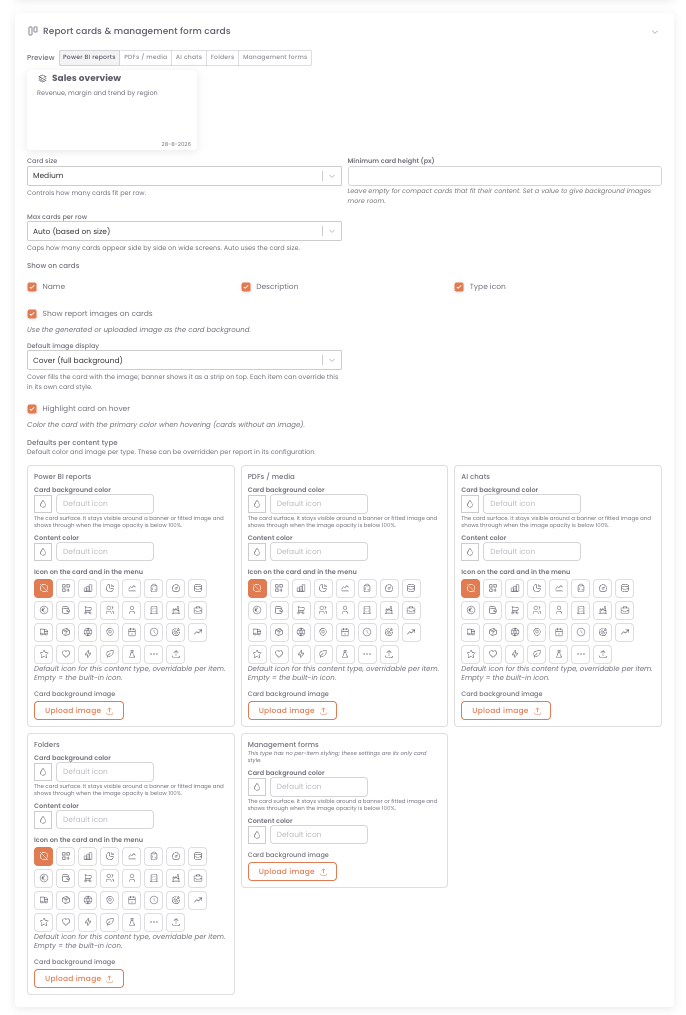
Report cards you can style. Upload an image as a tile background, change the tile colour, choose the card size, and decide which details appear on the card, such as the name and the description.
DataTako now features global card styling for Power BI report, PDFS, AI chats, folders and management forms as well as the ability to override styling on individual cards.
Global styling can be found in the settings under 'layout' and then in the 'Report cards & management form cards': https://app.datatako.com/settings/
Extended customer API
The customer API now features the abilility on all GET endpoints to also retrieve data from suborganisations (if enabled on the API key). Read more here: https://docs.datatako.com/features/datatako-api/
🔧 Smaller fixes
The report icon in the menu now shows consistently, instead of alternating with other icons.