
Embed data dashboards anywhere, accept every invitation in one click, and a What's new feed
🚀 Two releases in one update
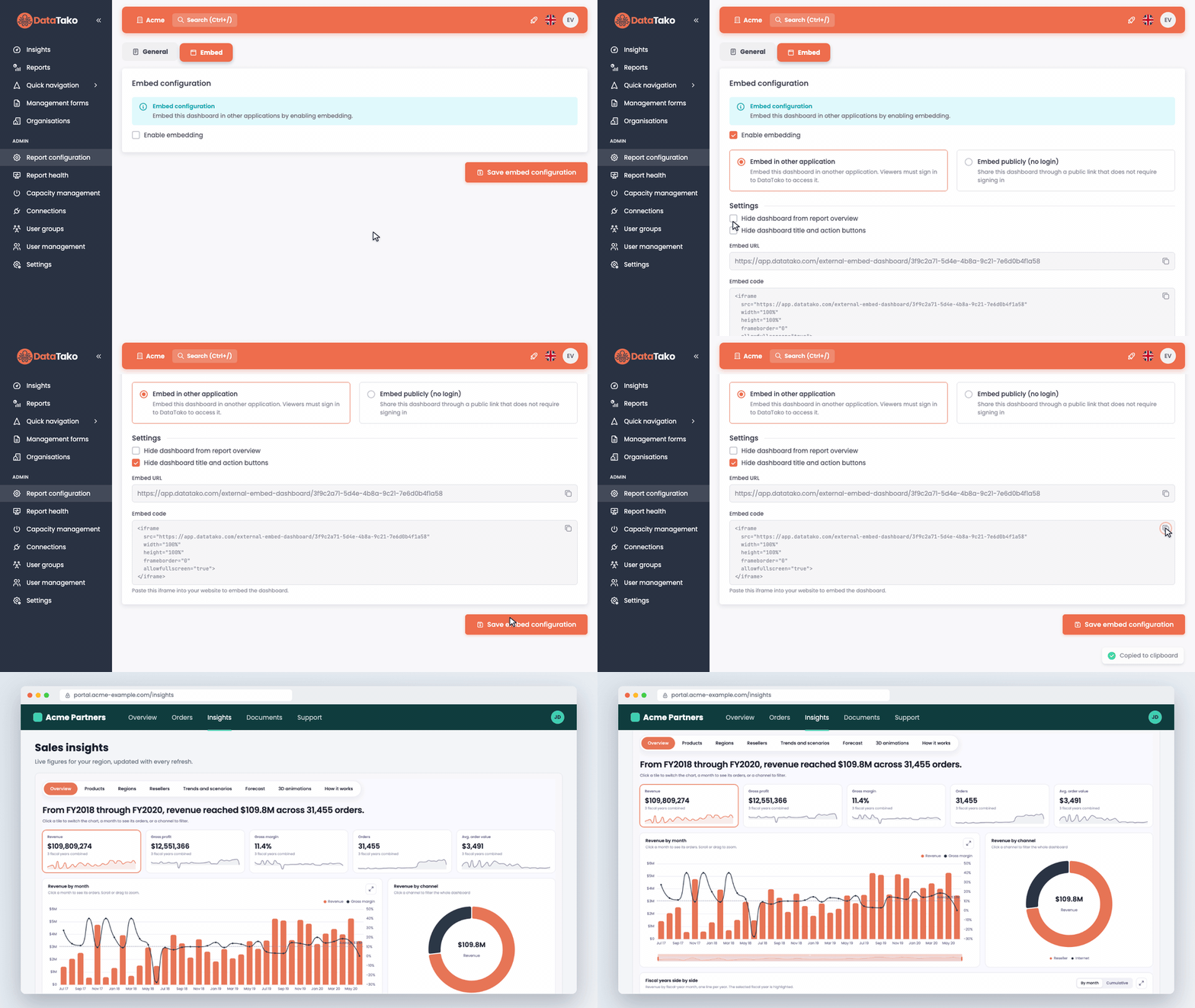
Data dashboards are growing up fast. This update brings bookmarks, revisions and embedding, a What's new feed inside DataTako, one overview of all AI and MCP activity, and a much smoother way to join new organisations.
📊 Data dashboards, ready for everyday use
-
Embed dashboards in your own website or portal. Put a data dashboard where your users already work. Choose an embed behind a DataTako sign in, or a public link for dashboards without row-level security. Copy the embed code, paste it into your page, and you're live.
-
Bookmarks. Save a filtered view of a dashboard and jump straight back to it.
-
Revisions. Every published version is kept, so you can see what changed and go back when you need to.
-
Straight into the report overview. A new dashboard shows up in the report overview right after its first publication.
👉 Build your first data dashboard →
📨 Accept every invitation in one click
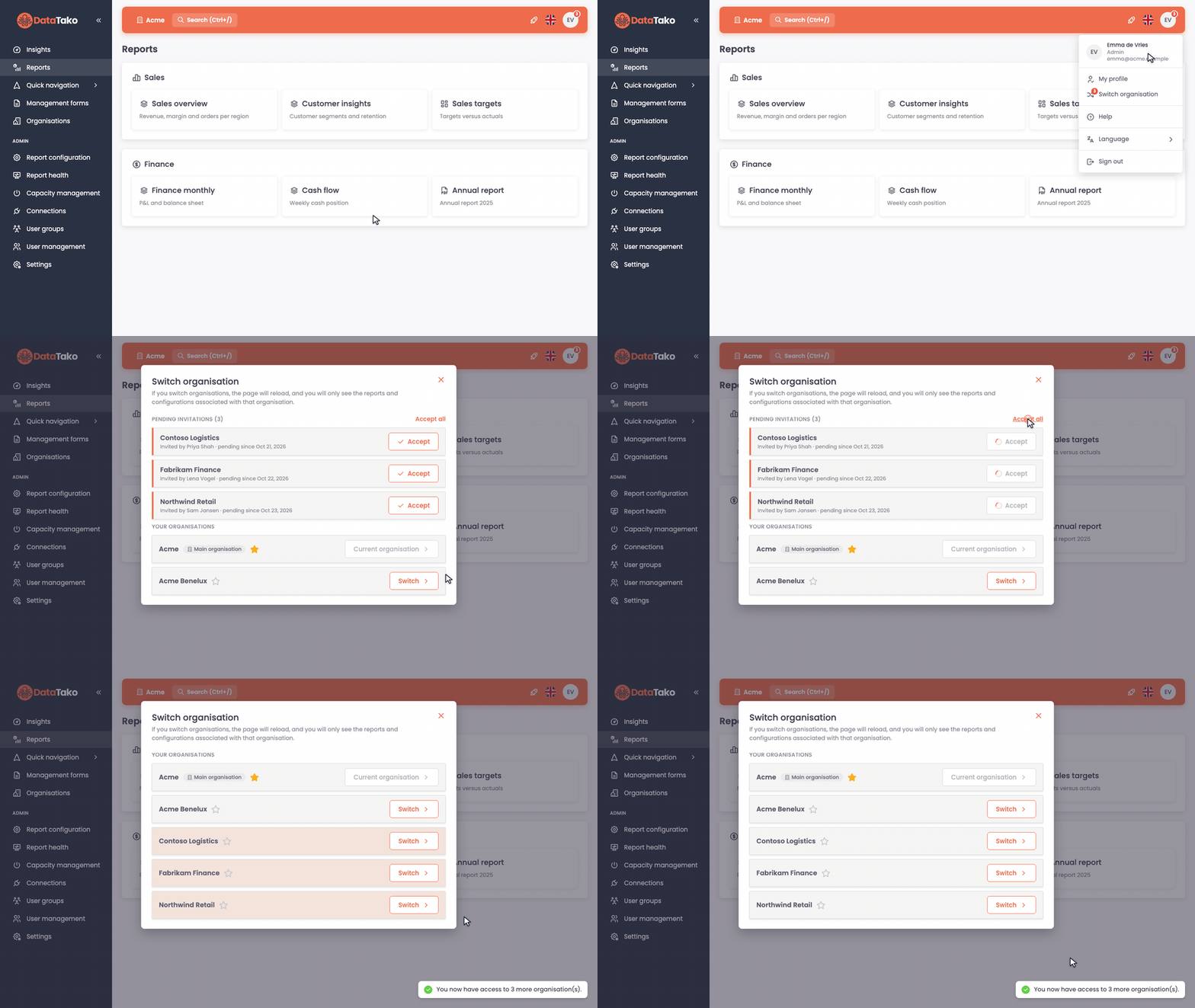
Been invited to several organisations at once? You no longer need to dig through a pile of emails and click every link separately.
-
A badge tells you something is waiting. When you have open invitations, a counter appears on your avatar and on Switch organisation.
-
Accept one or all. Open Switch organisation to see every pending invitation, who invited you and since when. Accept them one by one, or click Accept all.
-
Already on the activation page? When you activate your account, DataTako lists your other pending invitations too, so you can accept them all in the same step.
🆕 What's new, right inside DataTako
Administrators and editors now see the latest product updates without leaving the platform. Look for the 🚀 button in the top bar: it lights up when there's something new. Don't want it? Switch it off under Settings → Appearance → Layout.
🤖 AI and MCP: more insight, more control
-
One overview of all AI activity. See who and what is using AI assistants and connected AI apps across your organisation. Also available through the API.
-
Clear retention for AI data. AI app activity logs are kept for 6 months, AI query logs for 12 months, and deleted chat conversations are removed after 30 days. Read the details in our privacy policy.
🔐 Sign in and user management
-
Bring your own Microsoft app registration. Organisation admins can set up Microsoft sign in through their own app registration.
-
Features per sub organisation. Decide which features each sub organisation can use.
-
Mobile app links in invitations. Invitation emails now include links to the iOS and Android apps. You can switch this off in the email configuration.
🔌 DataTako API
-
Export AI chat conversations. Retrieve chat conversations and their messages through the Public API, for example for your own analysis or archive.
-
Folders in report groups. Report groups now return their folder names and folders.
-
AI apps activity. The Connect API now includes activity of connected AI apps.
🛠️ Improvements and fixes
-
A running refresh and its notice now show in every report that uses the same semantic model.
-
Searching for a workspace when choosing a semantic model works again, and row-level security requirements are checked again when you pick one.
-
Report pages that are hidden in Power BI now show when you explicitly select them in the report configuration.
-
Uploaded PDFs show their filename instead of an ID.
-
The Fit to width button works right away in Safari.
-
The Add AI agent button no longer appears when the AI agent feature is off.
-
Under the hood, DataTako now runs on .NET 10, with extra security hardening across the platform.
📚 Find all guides at docs.datatako.com. Questions or ideas? Let us know through the feedback button, we read everything.